
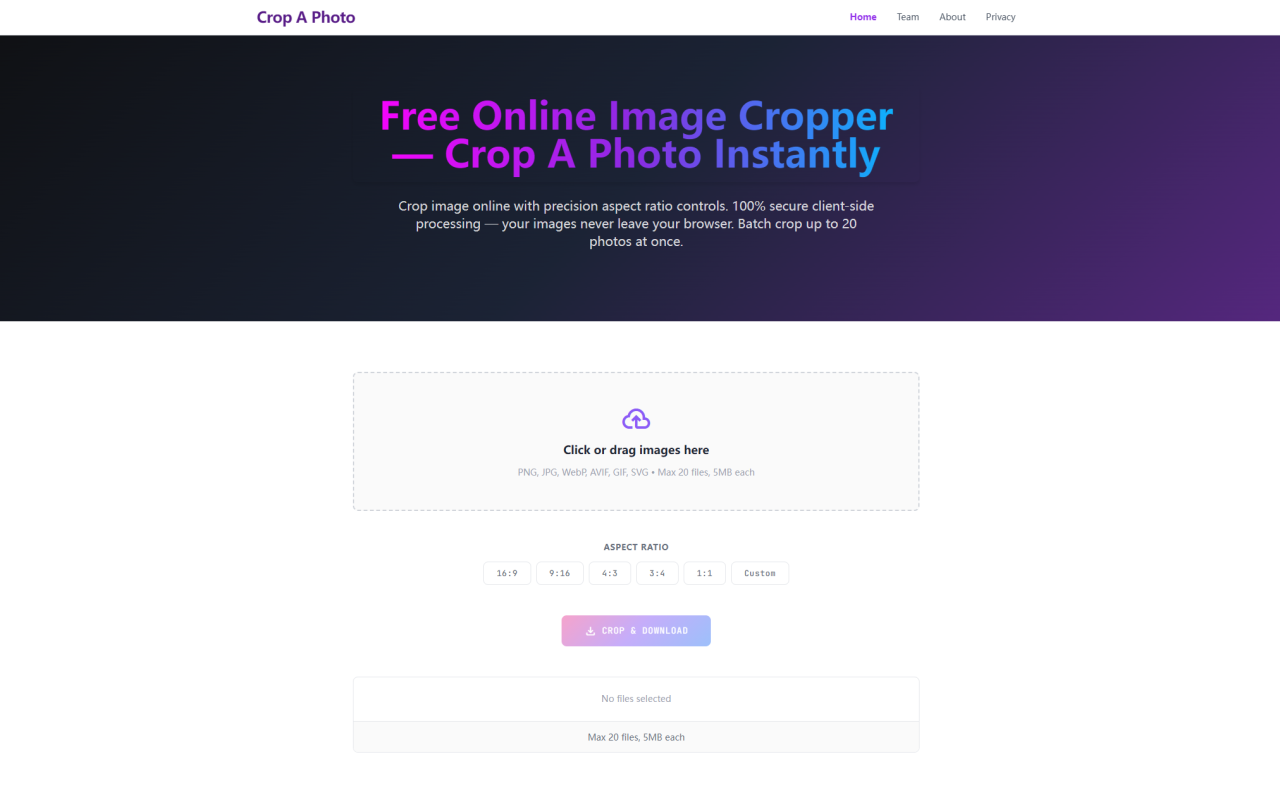
When I first landed on Crop A Photo, I was struck by how uncluttered the interface is. There is no sign-up gate, no tutorial overlay, and no request to grant permissions. A single dropzone dominates the center of the page with a clear label: "Drop files to execute instant picture crop routines across standard aspect ratios." The promise is that everything happens entirely in your browser, on your machine, without any data being sent to a server. I decided to test that claim thoroughly. After dragging in a batch of images and running through several cropping workflows, I can confirm that this tool does exactly what it advertises with surprising speed and a refreshing respect for privacy.
First Look: Interface and Onboarding
The page layout is minimal and purposeful. Above the dropzone, a modest banner ad sits unobtrusively — the site's only monetization method, as explained in the FAQ. There are no cookie pop-ups, no tracking consent walls, and no telemetry scripts. The team behind Crop A Photo, the 345tool collective, explicitly states that they reject tracking cookies and invasive popups. This is a breath of fresh air in a landscape where most free tools bury you in consent requests. The dropzone itself accepts PNG, JPG, WebP, AVIF, GIF, and SVG files, with a maximum of 20 files at a time and a 5MB per-file cap. Below the dropzone, a row of preset aspect ratio buttons lets you choose from 16:9, 9:16, 4:3, 3:4, 1:1, or a custom ratio. There is also a dedicated circle crop option for round avatars and profile pictures. The entire interface is responsive and works well on both desktop and mobile browsers.
Batch Cropping Workflow: Drag, Drop, and Download
Testing the bulk cropping workflow was straightforward. I selected a folder of twelve product photos — a mix of JPG and PNG files ranging from 200KB to 3MB — and dragged them into the dropzone. The interface instantly displayed thumbnail previews for each image along with a file count badge. The whole batch loaded in under a second. I selected the 1:1 square crop preset and clicked the "Crop & Download" button. What happened next is worth emphasizing: instead of bundling the cropped outputs into a ZIP archive, the browser triggered individual downloads for each processed image sequentially. Each file downloaded directly to my default download folder without any archive extraction step. This design choice, as the FAQ explains, avoids the common problem of mobile users lacking native ZIP tools or encountering paywalls for archive software. The individual download flow felt snappy and eliminated a friction point I hadn't even anticipated. For those who prefer a round crop, the circle image cropper module produces sharp, anti-aliased avatars by recalculating device pixel ratios during processing. I tested this with a few profile photos and the results were clean, with no blurry edges or jagged curves.
Privacy-First Architecture: What Running Locally Really Means
The most compelling aspect of Crop A Photo is its complete serverless architecture. Every image crop operation — every rectangle mask, every circular cut, every aspect ratio adjustment — is executed locally using HTML5 Canvas APIs within your browser's memory. No file bytes are ever transmitted to a remote server. To verify this, I opened my browser's developer tools and monitored the Network tab while processing a batch of images. There were zero outbound requests after the initial page load. The tool works even when I disconnected my internet connection after the page loaded — the cropping continued without interruption. This air-gapped processing model means that sensitive visual materials — unreleased product shots, confidential brand assets, identity documents — never leave your device. For designers, marketers, and anyone handling proprietary imagery, this eliminates entire categories of data leakage risk. The trade-off is that all processing relies on your device's hardware, which explains the 20-file and 5MB-per-file limits. These constraints prevent browser memory overload and ensure smooth performance even on modest laptops.
Supported Formats and Aspect Ratio Presets
The tool supports a broad range of common image formats: PNG, JPG, WebP, AVIF, GIF, and SVG. This covers virtually everything a typical web designer or content creator deals with on a daily basis. The aspect ratio presets are clearly geared toward modern content requirements. The 16:9 and 9:16 options cover landscape and portrait video thumbnails, social media stories, and presentation slides. The 4:3 and 3:4 presets work well for print-adjacent layouts, email headers, and document imagery. The 1:1 square preset is ideal for e-commerce product grids, Instagram posts, and profile pictures. The custom ratio option accepts any width and height values you specify, giving you full control for specialized layouts. If you need a circle crop, that option is also available as a distinct mode. The output format for circle crops defaults to PNG to preserve transparency, while rectangle crops maintain the original input format. I did notice that there is no option to change the output format or adjust compression quality — the tool simply preserves the original file type and resolution. For most casual and semi-professional use cases, this behavior is acceptable, but power users who need fine-grained control over output quality might find this limitation noticeable.
Performance, Limits, and Who This Tool Serves
During my testing, Crop A Photo performed reliably with batches of 15-20 images. Processing time was nearly instant for small files, and even 3-4MB images took only a second or two per batch. The 5MB file cap and 20-file batch limit are enforced at the dropzone level with a clear visual indicator when a file exceeds the size threshold. These limits are a pragmatic compromise for a client-side tool — pushing beyond them would risk browser crashes and sluggish performance on lower-end devices. The tool is best suited for content creators, social media managers, e-commerce sellers, and designers who need to quickly resize or crop collections of product photos, avatar sets, or asset libraries without compromising privacy. It is not a replacement for full-featured desktop software like Photoshop or GIMP, but it is an excellent lightweight utility for rapid bulk cropping tasks. The FAQ also confirms that Crop A Photo is developed and maintained by the 345tool collective, an open-source-oriented group focused on building privacy-first web utilities. The monetization model relies solely on contextual banner ads, with a plan to transition to high-quality B2B link partnerships over time. There are no premium tiers or paid upgrades — the tool is free, fully functional, and does not impose usage caps beyond the technical limits mentioned.
Crop A Photo delivers exactly what it promises: a fast, private, and free bulk image cropper that runs entirely in your browser. Its client-side architecture sets it apart from virtually every other online cropping tool, and the direct download workflow eliminates the annoyance of ZIP archives. While the file size and batch limits may not suit heavy production pipelines, the tool is more than capable for everyday cropping needs. Visit Crop A Photo at https://cropaphoto.com to explore it yourself.


コメント