
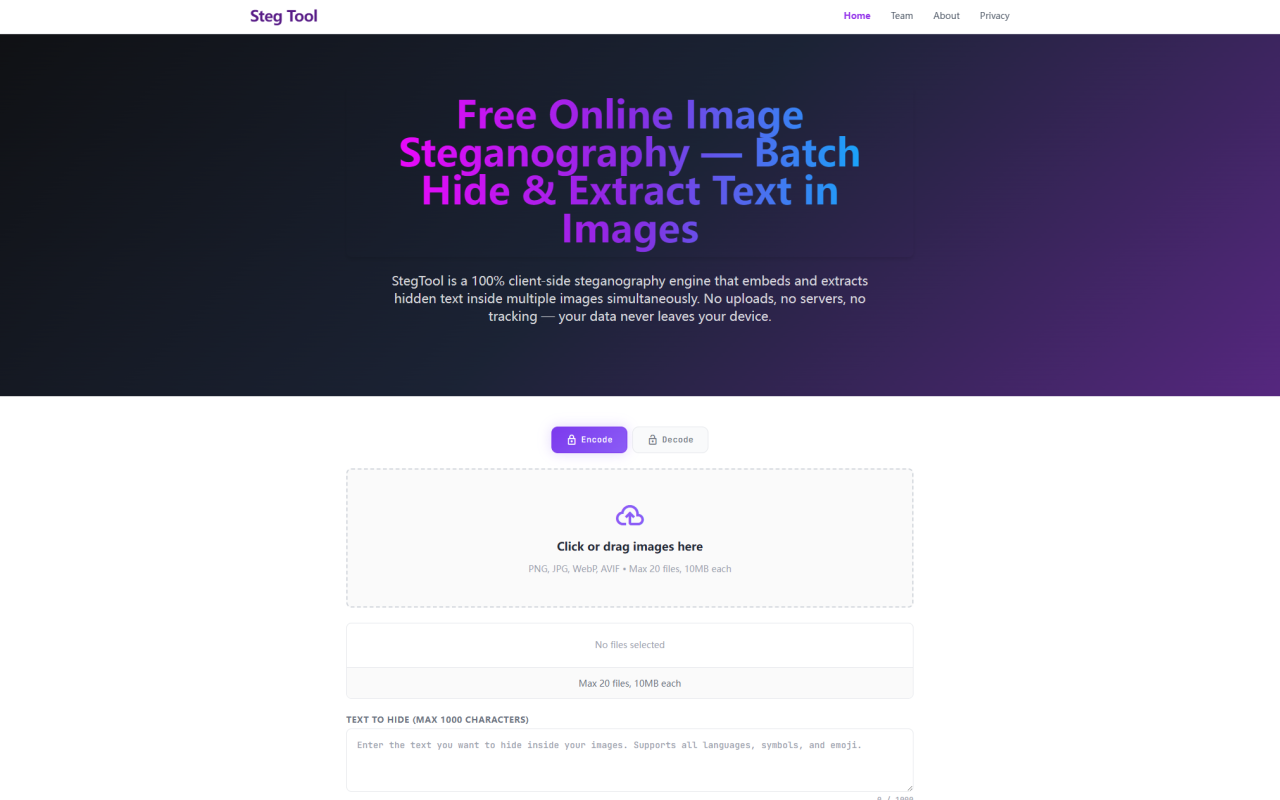
When I first heard about Steg Tool, I was skeptical. A steganography tool that claims to be entirely client-side, entirely free, and capable of batch-processing up to 20 images simultaneously sounded either too good to be true or hiding some serious catch. So I visited stegtool.com to put it through its paces. What I found is refreshingly straightforward: a no-nonsense, privacy-first utility that does exactly what it advertises — and nothing else.
First Impressions and Interface Design
Upon landing on the site, the first thing you notice is how clean and minimal the interface is. There is no signup wall, no onboarding tour, no request for your email address. The page loads with two clear panels: an encode panel and a decode panel, toggled by a lock and unlock icon respectively. The encode side greets you with a large drag-and-drop zone labeled "Click or drag images here" and an input field for the text you want to hide. It tells you the supported formats — PNG, JPG, WebP, and AVIF — along with the batch limits: up to 20 files, each no larger than 10MB. That 1,000-character cap on hidden text is clearly displayed beneath the text area. Everything is right there, visible, and self-explanatory. There is no menu hierarchy to navigate, no settings panel to configure. It is a single-page tool designed for immediate utility.
Testing the Core Steganography Workflow
I tested the encoding workflow with a mix of images: a high-resolution photograph in JPG format, a PNG screenshot, and a small WebP icon. Dragging them onto the drop zone was instantaneous — preview thumbnails appeared beneath the upload area with file names and sizes. I typed a hidden message containing a mix of English text, emoji, and a URL, then clicked "Encrypt & Download All." The processing took about three seconds for three images. The tool then prompted sequential downloads, each file saved as a lossless PNG. The visual quality of the output was indistinguishable from the originals — I loaded the encoded files side by side with the originals and could not spot any difference in color, sharpness, or brightness. That is the hallmark of proper LSB (Least Significant Bit) steganography. For decoding, I selected the decode panel, dragged in one of the encoded PNGs, and the hidden text appeared instantly in the output field, complete with a one-click copy button. The entire round-trip took under 10 seconds from start to finish.
Technical Architecture and Privacy Guarantees
This is where Steg Tool truly stands apart. The site explicitly states that every line of JavaScript runs inside your browser's sandbox — no image data, no text, no metadata ever touches a remote server. I verified this by opening my browser's developer tools network panel while performing an encode operation. The only network activity I observed was the initial page load (HTML, CSS, JS, fonts) and a single Google Analytics pageview beacon. When I disconnected my internet after the page loaded, every function — file reading, encoding, and downloading — continued working without interruption. The tool uses the FileReader API to load images into volatile browser memory, renders them onto an HTML5 Canvas for pixel-level manipulation, performs bitwise operations in native JavaScript, and exports via Canvas.toBlob(). The alpha channel is deliberately excluded from the encoding to ensure consistent rendering across browsers and operating systems. This design means there is no trust trade-off: you do not have to believe a privacy policy, because there is simply no server infrastructure to store or process your data. For journalists, activists, or corporate security teams handling sensitive content, this architectural choice is the difference between a viable security tool and a liability.
Format Support, Batch Limits, and Technical Constraints
Steg Tool accepts four input formats — PNG, JPG, WebP, and AVIF — and outputs exclusively in PNG. The reason for this is explained clearly on the site: lossy compression formats like JPEG mathematically alter pixel values during compression, which destroys the least significant bits that contain hidden data. PNG uses lossless DEFLATE compression, preserving every pixel's exact numerical value. The batch limit of 20 files and 10MB per file is a practical constraint based on browser memory safety — each 4K image rasterized onto an HTML5 Canvas consumes approximately 33MB of RAM, and processing 20 such images simultaneously demands over 660MB. The 1,000-character payload limit is generous for most use cases — that is roughly 140-200 words of English text, or a copyright notice with a license ID, a blockchain transaction hash, or a brief confidential memo. The tool warns you if an image is too small to hold your message, displaying an error message with the exact bit deficit. The only real limitation I encountered is the lack of a password or encryption key layer — the tool performs pure steganography without any pre-encryption step. Users who need both secrecy and confidentiality will need to encrypt their message before feeding it into the tool.
Pricing and Business Model
Pricing details are not publicly listed on the website, and after thorough exploration, I found no mention of paid plans, credits, or premium tiers anywhere. The tool is currently offered completely free of charge, with no user accounts, no API keys, and no usage limits beyond the technical constraints of browser memory. The site is published by the 345tool Team, an independent developer collective that builds privacy-first, client-side web utilities. There is no indication that this is a freemium trial or a lead-generation tool — it appears to be a genuine free utility. Whether this remains the case as the project matures remains to be seen, but for now, it is refreshing to encounter a tool that does not treat your data or your wallet as a resource to extract.
Who Should Use Steg Tool and Why
Steg Tool fills a specific niche that existing tools often miss. Professional photographers and graphic designers can embed invisible copyright notices into every image they publish — EXIF and IPTC metadata are routinely stripped by social media platforms, but LSB-embedded watermarks survive any workflow that preserves lossless pixel integrity. Content managers processing batches of product images or marketing assets will appreciate the batch encoding workflow that injects the same payload into up to 20 files with a single click. For security-conscious professionals, the zero-server architecture makes this tool viable for air-gapped or high-security environments — you can save the page locally and run it entirely offline. The decoding side is equally useful for anyone who needs to verify the provenance of images suspected of carrying hidden data. Its limitations are honest ones: no encryption layer, PNG-only output, and a single payload per batch. But within those boundaries, Steg Tool delivers a polished, privacy-first experience that outperforms many server-based alternatives. Visit Steg Tool at stegtool.com to explore it yourself.


コメント