
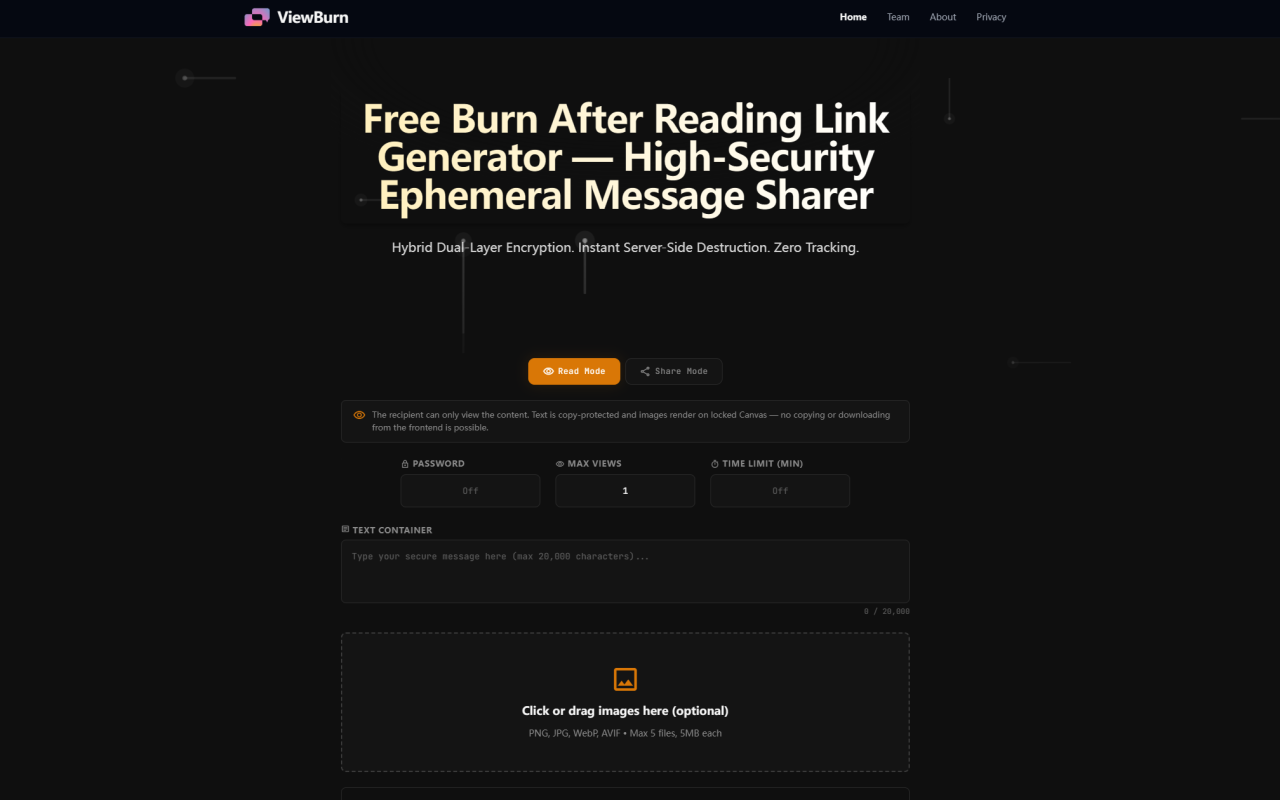
ViewBurn is a free, no-account-required burn-after-reading link generator that lets you send self-destructing text messages and images with encryption at rest and in transit. It sits in a quiet corner of the web — no login walls, no newsletter popups, no tracking scripts. You land on a single-page dark interface, type your message or drop an image, set your security parameters, and generate a one-time link. That link self-destructs after the recipient views it, or after a timer expires, whichever comes first. It is built for anyone who needs to share sensitive data — passwords, API tokens, private notes, confidential previews — without leaving a permanent record in a chat log or email inbox.
First Impressions and Interface Layout
Upon visiting ViewBurn, the first thing you notice is how aggressively minimal the page is. No sign-up button. No cookie consent banner. No onboarding tutorial. The entire tool lives on a single page with a dark background and clean typography. At the top, a toggle switches between Read Mode (copy-protected, locked Canvas rendering) and Share Mode (downloadable text and images). Below that, you see a password field, a max view counter slider (1 to 9,999), and a time limit dial (1 to 1,440 minutes). The main workspace is split into two containers: a text box (up to 20,000 characters) and an image upload zone (up to 5 files at 5MB each, supporting PNG, JPG, WebP, and AVIF). A large Generate One-Time Link button sits at the bottom.
The design philosophy here is clearly intentional: removing every possible friction point. You do not register an account, verify an email, or agree to terms before using the tool. You just start typing and click generate. The link appears instantly with a copy button, and a small status line shows the remaining time and view count. A Burn Now button next to the link lets you manually destroy it before the recipient opens it. The whole workflow from landing to link generation can happen in under ten seconds.
Hybrid Dual-Layer Encryption Architecture
ViewBurn's most distinctive technical feature is what the developers call hybrid dual-layer encryption. When you create a message, the data is first encrypted in your browser using AES-256-CBC before it ever leaves your machine. That encrypted blob is then transmitted to the server, where it is stored in a sandboxed directory with no plaintext access paths. The server never holds a recoverable version of your content. When the recipient clicks the link, the server delivers the encrypted stream, the client-side decryption engine reassembles it in the browser's memory, and the server instantly executes an irreversible unlink() on the underlying payload file — no backups, no recycle bin, no disk cache.
The development diary (publicly available on the site) reveals that v1.x stored plaintext JSON files on the server during the brief window between generation and access. That was addressed in v2.0 with full AES-256-CBC encryption plus PBKDF2 key derivation for password-protected links. The encryption key for standard links is embedded as a base64 query parameter in the URL and never touches persistent storage. For password-protected links, the key is derived from the passphrase using PBKDF2 with SHA-256 at 100,000 iterations and a 128-bit random salt. The result is that even with full server access, an attacker sees only opaque binary strings with no content-type metadata.
There is also a cron-based cleanup daemon that runs every three minutes, sweeping directories for orphaned or expired payload files. Combined with the instant destruction on access, this means no file survives on disk beyond its configured time-to-live, and most are deleted within milliseconds of being read.
Granular Security Controls
ViewBurn does not just offer a single on-off switch for destruction. You get four independent parameters that can be combined in any configuration. The first is a custom secondary password, which creates an additional gate before the decryption engine initializes. If an attacker gets hold of the one-time link, they still cannot view the content without the passphrase. Incorrect password attempts return a generic error with no diagnostic information, preventing oracle-based brute-force attacks.
The second parameter is view limits. You can set the exact number of permitted views from 1 all the way up to 9,999. Each time the recipient (or anyone with the link) opens the page, the counter increments. When it hits the limit, the server deletes the payload permanently. This is useful for sharing content with multiple team members while still enforcing an absolute cap on exposure.
The third parameter is the time limit, adjustable from 1 minute to 1,440 minutes (24 hours). The recipient's browser shows a countdown timer on the page. When it reaches zero, the page force-reloads, and if the view limit has not been reached, the server checks whether the payload should be re-rendered or destroyed. If the time expires, the cron daemon purges the file even if no one ever opened the link.
The fourth control is the mode toggle between Read Mode and Share Mode, which acts as a permission firewall on the content itself rather than on access.
Read Mode vs Share Mode
ViewBurn ships two distinct content protection modes, and the difference between them is substantial enough to treat this as a core feature rather than a footnote. Read Mode (the default) treats the payload as a visual-only stream. Text receives CSS-level copy protection — user-select: none, right-click context menu suppression, and keyboard interception for Ctrl+C and Cmd+C. Images bypass the standard <img> tag entirely and are rendered onto isolated Canvas nodes with pointer-events: none. No standard browser mechanism — DevTools inspection, scraping extensions, or drag-and-drop — can extract the visual content as a file. The recipient sees it on screen but cannot save it locally.
Share Mode inverts these constraints. The text container adds a Copy All Text button at the bottom. Each image receives a Download Image button that saves a metadata-free PNG file via blob URL download. The content is still ephemeral — the link still self-destructs after the view limit is reached or the timer expires — but the recipient can take a copy before it vanishes. This is useful for scenarios where the sender wants the data to be usable but still wants it removed from the server after a controlled window. The mode can be toggled per message, and the choice is made before generation — there is no retroactive change.
One nuance worth noting: Read Mode is effective against casual extraction but not against determined bypasses. A recipient could take a photograph of the screen with a second device, or use screen recording software. ViewBurn's documentation honestly acknowledges this limitation. The tool raises the cost of data extraction; it does not eliminate it entirely.
Pricing and Use Cases
Pricing details are not publicly listed on the website because there are no pricing plans. ViewBurn is completely free to use. There is no paid tier, no premium features behind a paywall, and no limits on the number of links you can generate. The tool is developed and maintained by the 345tool Engineering Collective, an independent group that builds privacy-focused client-side web utilities. Their business model appears to be indirect — the 345tool.com directory and related tools generate traffic and visibility, and the individual tools themselves remain free.
The use cases are straightforward. IT administrators can share API tokens and SSH keys without leaving traces in Slack or email. Developers can send database credentials to colleagues with automatic expiration. Legal professionals can circulate confidential document previews that cannot be downloaded. Journalists can share sources' materials with password protection. Designers can send single-view mockups to clients without worrying about unauthorized redistribution. In every case, the value proposition is the same: the message disappears after delivery, with no account trail, no server logs linking the content to you, and no way for the recipient to accidentally expose it later by scrolling up in a chat history.
Visit ViewBurn at https://viewburn.com to explore it yourself.


コメント